Monitoring, Lineage & Observability
[!NOTE] The OSS release includes lineage injection, run logs (JSON + table backends), quarantine ratios, SLO scoring (freshness/availability), streaming test data simulation, and event-driven alerting via Slack, Email, Teams, and Webhooks. Enterprise orchestration plugins remain on the roadmap.
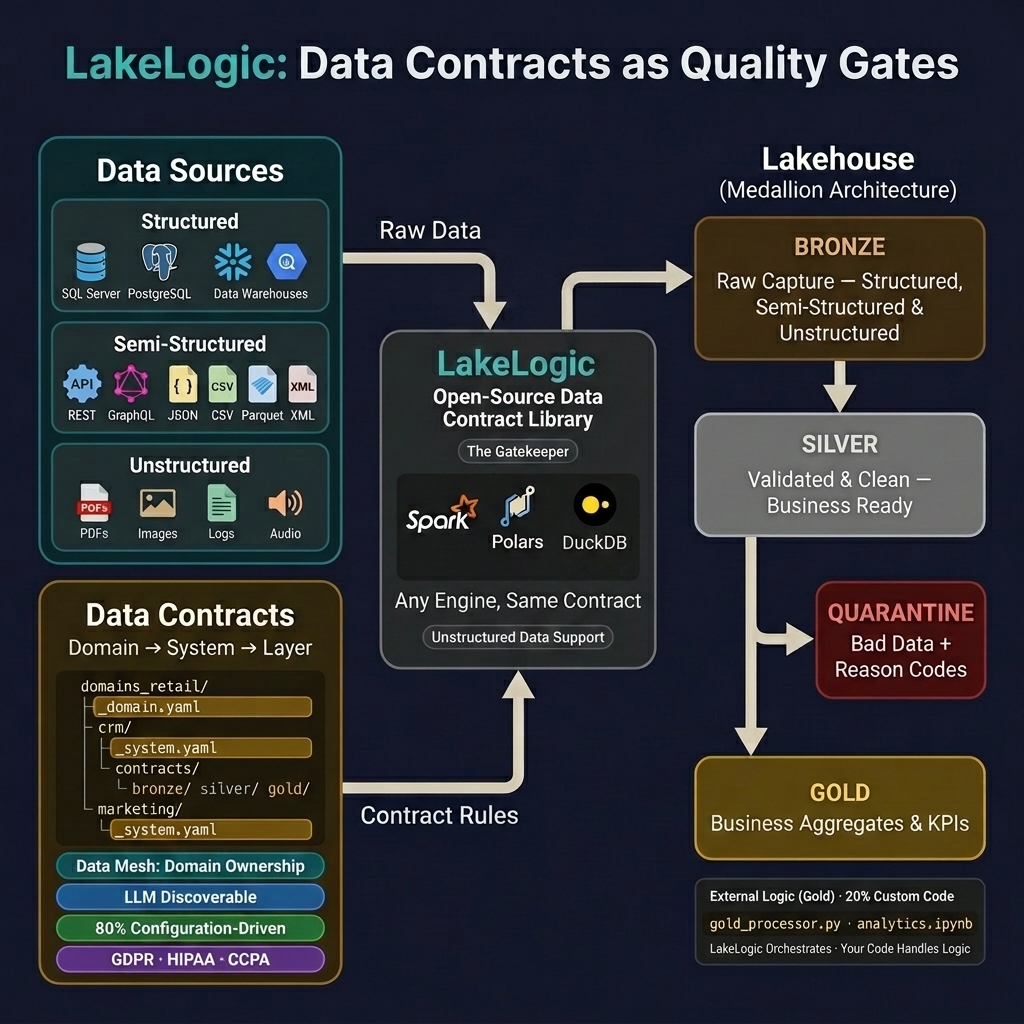
Observability in LakeLogic is driven directly by contract configuration. Without writing custom logging wrappers, the data mesh automatically emits runtime metrics, records row-level quality failures, and injects lineage metadata directly into materialized files.
1. Pipeline Visualization (DAG)
LakeLogic builds an interactive pipeline DAG directly from your active contracts by resolving explicit depends_on relationships and implicit target schemas.
The DAG automatically collapses gaps. If you skip a Gold layer and point Downstream systems directly to Silver, the visualization closes the visual gap instantly.
2. System-Level Lineage
Lineage tracking creates an audit trail that answers precisely which source run created a specific row in your data lake.
Minimal Lineage Injection
LakeLogic attaches execution metadata directly into the schema of materialized tables. By default, you can restrict this to just the _lakelogic_run_id to prevent wide tables:
lineage:
  enabled: true
  capture_run_id: true
  capture_timestamp: false
  capture_source_path: false
  capture_domain: false
  capture_system: false
Preserving Upstream Lineage
When moving data from Bronze -> Silver -> Gold, you can retain the upstream identifiers before stamping the new run ID:
(Produces a new_upstream_lakelogic_run_id column alongside the new _lakelogic_run_id.)
Gold Rollups & Traceability
For aggregated Gold datasets, LakeLogic supports explicit rollup mechanisms that retain drill-down keys from the Silver runs:
transformations:
  - rollup:
      group_by: ["sale_date"]
      aggregations:
        total_sales: "SUM(amount)"
      keys: "sale_id"
      rollup_keys_column: "_lakelogic_rollup_keys"
      rollup_keys_count_column: "_lakelogic_rollup_keys_count"
3. Run Logging & Auditing
Every contract execution generates a structured run log containing row counts, SLO measurements, and source manifest details.
JSON Logging
Produces:
{
  "run_id": "3c2b6e1e-8b4a-4c2e-9b71-9a6d6f9c7b2a",
  "pipeline_run_id": "f4f86bb1d6ad4a7a8db74ea95aa324e5",
  "timestamp": "2026-02-05T12:34:56.789+00:00",
  "engine": "polars",
  "contract": "Customer Master Data",
  "stage": "silver",
  "counts": {
    "source": 12,
    "total": 9,
    "good": 5,
    "quarantined": 4,
    "quarantine_ratio": 0.4444
  },
  "slos": {
    "freshness": {"passed": true},
    "availability": {"passed": true}
  }
}
Table Backend Logging
Logs can be appended to central Delta, DuckDB, or SQLite tables for SQL-based monitoring:
metadata:
  run_log_table: main.governance.lakelogic_runs
  run_log_backend: spark
  run_log_merge_on_run_id: true
  run_log_table_format: delta
Analytical Queries
Quarantine trend by day:
SELECT DATE(timestamp) AS run_date, AVG(quarantine_ratio) AS avg_q_ratio
FROM main.governance.lakelogic_runs GROUP BY DATE(timestamp) ORDER BY run_date;
SLO failures in the last 7 days:
SELECT run_id, timestamp, freshness_pass, availability_pass
FROM main.governance.lakelogic_runs
WHERE timestamp >= CURRENT_DATE - INTERVAL '7' DAY
  AND (freshness_pass = false OR availability_pass = false);
4. Synthetic Data & Streaming Simulation
LakeLogic includes a built-in DataGenerator that produces schema-aware synthetic data directly from your contracts — no external tools needed. This is critical for testing observability pipelines when production data isn't available.
Time-Windowed Generation
Generate data constrained to a specific time window. All timestamps, dates, and epoch fields are automatically bounded:
from lakelogic import DataGenerator
from datetime import datetime, timedelta

gen = DataGenerator("contracts/bronze_events.yaml")

end = datetime.now()
start = end - timedelta(minutes=5)
df = gen.generate(rows=100, window_start=start, window_end=end)
# Every timestamp in df falls within [start, end]
Continuous Streaming Simulation
generate_stream() produces successive batches of time-windowed data, simulating a real streaming source. Each batch is automatically saved into partitioned directories matching your landing zone structure:
for ws, we, df in gen.generate_stream(
    rows_per_batch=100,
    interval_minutes=5,
    batches=12,
    output_dir="landing/events",
):
    print(f"Batch {ws:%H:%M} → {we:%H:%M}: {len(df)} rows")
Produces:
landing/events/
├── yyyy=2026/mm=04/dd=11/hh=06/mi=05/batch.parquet
├── yyyy=2026/mm=04/dd=11/hh=06/mi=10/batch.parquet
├── yyyy=2026/mm=04/dd=11/hh=06/mi=15/batch.parquet
└── ...
This is invaluable for:
- SLO threshold testing — generate "stale" data to verify freshness alerts fire correctly
- Pipeline stress testing — simulate high-volume ingestion across multiple partitions
- Watermark validation — confirm incremental pipelines correctly pick up new partitions
- Quarantine testing — inject
invalid_ratio=0.1to test quarantine routing under load
5. SLO Freshness Validation
Active Validation vs. Passive Telemetry (Run Logs)
It is important to understand why LakeLogic utilizes both Run Logs and a standalone SLOValidator:
- Run Logs (Passive Telemetry): Represent point-in-time execution history. They answer: "When this pipeline last ran, what happened?" Thanks to built-in exception handling, run logs will record when a pipeline fails (e.g., bad data, schema drift, API timeouts). However, if your orchestrator crashes, a spot instance is preempted, or the schedule is simply missed, no run log is ever emitted. Run logs cannot reliably catch these "silent orchestration failures" because they rely on the Python process successfully initiating to write the log.
- SLOValidator (Active Observability): Operates continuously and out-of-band. It scans the actual physical data lake partitions (Delta/Parquet) to evaluate the current reality of the data. If a table hasn't been updated in 12 hours (breaching a 6-hour SLO), the
SLOValidatorwill query the files directly and correctly flag the dataset as❌ STALE, catching silent orchestrator deaths that run logs miss.
Running the Validator
The SLOValidator automatically checks every active contract against your layer-level freshness SLOs, reading from materialized Delta tables:
from lakelogic.core.registry import DomainRegistry
from lakelogic.core.slo import SLOValidator

registry = DomainRegistry.from_yaml("_system.yaml")
validator = SLOValidator(registry=registry, polars=True)
breaches = validator.check_freshness()
Output:
🔍 SLO Freshness Check: scanning 4 contracts in marketing/google_analytics
📊 SLO Freshness Summary: 4 checks | ✅ 2 passed | ❌ 2 failed | ⚠️ 0 errors
   ✅ [bronze] events: ✅ OK (delay: 12.3min, SLO: 60min)
   ✅ [bronze] sessions: ✅ OK (delay: 14.1min, SLO: 60min)
   ❌ [silver] events: ❌ STALE (delay: 312.5min, SLO: 240min)
   ❌ [silver] sessions: ❌ STALE (delay: 290.1min, SLO: 240min)
Breaches are automatically routed to your configured notification channels (Slack, Email, Teams, Webhooks) via the notifications block or ownership.contacts in your _domain.yaml.
6. Unstructured Data Processing (LLM Extraction)
LakeLogic extends its contract-driven approach to unstructured data — PDFs, images, audio, video, and free-text fields. The same quality rules, materialization, lineage, and observability apply.
How it works
  Raw Source          LLM Extraction         Quality Rules        Output
┌──────────┐      ┌─────────────────┐     ┌──────────────┐    ┌─────────┐
│ CSV/PDF/ │ ──→  │ Preprocess      │ ──→ │ Validate     │ ──→│ Delta/  │
│ Image/   │      │ → Prompt        │     │ Quarantine   │    │ Parquet │
│ Audio    │      │ → LLM API       │     │ Materialize  │    │         │
└──────────┘      │ → Parse JSON    │     └──────────────┘    └─────────┘
                  └─────────────────┘
Observability features
- Confidence scoring — Each extracted row gets a
_lakelogic_extraction_confidencescore (field completeness, log probs, or self-assessment) - Cost tracking —
max_cost_per_runandmax_rows_per_runbudget caps prevent runaway LLM costs - PII safety —
redact_pii_before_llm: truestrips sensitive fields before they reach the LLM API - Retry with fallback — Exponential backoff with automatic fallback to a cheaper model
- Full lineage — Every extracted row includes the source file path and extraction run ID
Supported content types
| Type | Processing | Use Case |
|---|---|---|
| OCR + page chunking | Invoices, contracts, reports | |
| Image | OCR → text extraction | Receipts, labels, forms |
| Audio | Whisper transcription | Call centre recordings, meetings |
| Video | Audio track → Whisper | Training videos, CCTV metadata |
| HTML | Built-in parser | Web scrapes, emails |
| Free text | Direct extraction | Support tickets, reviews, descriptions |
Example: Invoice extraction contract
extraction:
  provider: "openai"
  model: "gpt-4o"
  preprocessing:
    content_type: "pdf"
    ocr:
      enabled: true
      engine: "azure_di"
  output_schema:
    - name: "invoice_number"
      type: "string"
      extraction_task: "extraction"
    - name: "vendor_name"
      type: "string"
      extraction_task: "ner"
    - name: "total_amount"
      type: "float"
  confidence:
    enabled: true
    method: "field_completeness"
  max_cost_per_run: 25.00
  redact_pii_before_llm: true
See the full LLM Extraction guide for all configuration options.
7. Pipeline Cost Intelligence
LakeLogic can estimate the compute cost of every pipeline run and record it alongside your existing run log metrics. This enables per-entity, per-layer, and per-domain cost tracking — directly from your contract configuration, with no external billing integration required for the MVP.
Enabling Cost Tracking
Add a cost: block to your _system.yaml. All contracts in the system inherit this configuration:
cost:
  provider: "manual"                    # "none" | "manual" | "databricks_uc"
  attribution: "duration_proportional"  # How cost is split in multi-task pipelines
  currency: "USD"

  rates:
    dbu_per_hour: 0.22                  # Databricks Jobs Compute DBU rate
    storage_per_gb_month: 0.023         # Delta storage (ADLS/S3)
Cost Providers
| Provider | How It Works | Confidence |
|---|---|---|
none |
Cost tracking disabled (default) | — |
manual |
duration_seconds × dbu_per_hour / 3600 |
Estimated |
databricks_uc |
Queries system.billing.usage by run_id tag, falls back to manual |
Exact (when tag found) |
Run Log Schema
Three new columns are automatically added to every run log backend (Spark, DuckDB, SQLite, Delta):
| Column | Type | Description |
|---|---|---|
estimated_cost |
DOUBLE | Estimated compute cost for this run |
cost_currency |
STRING | ISO 4217 currency code (e.g., USD) |
cost_confidence |
STRING | "exact", "estimated", or "none" |
Existing run log tables are migrated automatically via ALTER TABLE ADD COLUMN on the next run — no manual migration needed.
Analytical Queries
Total cost by domain (last 30 days):
SELECT domain, SUM(estimated_cost) AS total_cost, COUNT(*) AS runs
FROM main.governance.lakelogic_runs
WHERE timestamp >= CURRENT_DATE - INTERVAL '30' DAY
  AND estimated_cost IS NOT NULL
GROUP BY domain
ORDER BY total_cost DESC;
Cost per entity per layer:
SELECT data_layer, dataset,
       ROUND(AVG(estimated_cost), 4) AS avg_cost,
       ROUND(SUM(estimated_cost), 4) AS total_cost,
       COUNT(*) AS runs
FROM main.governance.lakelogic_runs
WHERE estimated_cost > 0
GROUP BY data_layer, dataset
ORDER BY total_cost DESC;
Cost anomaly detection (runs 3× more expensive than average):
WITH stats AS (
  SELECT dataset, AVG(estimated_cost) AS avg_cost, STDDEV(estimated_cost) AS std_cost
  FROM main.governance.lakelogic_runs
  WHERE estimated_cost > 0
  GROUP BY dataset
)
SELECT r.run_id, r.dataset, r.estimated_cost, s.avg_cost
FROM main.governance.lakelogic_runs r
JOIN stats s ON r.dataset = s.dataset
WHERE r.estimated_cost > s.avg_cost + (3 * s.std_cost);
SaaS Observatory Integration
When the LakeLogic Cloud remote observer is enabled, cost data flows automatically to the Observatory Cost tab, where you can:
- View total estate cost with period selectors (7d / 14d / 30d / 90d)
- Drill into domain → system → layer cost breakdown
- Visualise daily cost trends as stacked area charts
- Correlate cost spikes with quality incidents
How It Works Internally
Pipeline run completes
    → processor.py calculates run_duration_seconds
    → resolve_cost_provider() reads cost: from contract metadata
    → ManualCostProvider: hours × dbu_per_hour × avg_nodes → estimated_cost
    → Cost fields injected into run report
    → run_log.py persists to run log table
    → observer.py transmits to SaaS (if enabled)
Design principle: Cost estimation is fail-safe. If the provider crashes, the pipeline continues normally with
cost_confidence = "none". Cost tracking never blocks data delivery.
Configuration
Enable the push by adding an observatory block at the registry (or contract) level:
observatory:
  enabled: true
  endpoint: https://api.lakelogic.io/api/v1/operations/run-logs/ingest
  api_key: llc_sk_...          # org-scoped key with the operations:ingest scope
  emit_on: [success, partial, failed]   # which run statuses to send
  environments: [production]            # optional allow-list (empty = all)
  layers: [silver, gold]                # optional allow-list (empty = all)
  include_quarantine_sample: false      # rule attribution: which rules failed + counts (max 50)

  # Offline durability — buffer failed pushes and replay them later.
  spool:
    enabled: true               # default true when observatory is enabled
    dir: ~/.lakelogic/observatory_spool
    max_files: 500              # ring-buffer cap (oldest dropped beyond this)
    ttl_days: 7                # discard buffered logs older than this
    batch: 20                  # max logs replayed inline per run
    max_seconds: 5.0           # wall-clock budget for an inline replay
Only run-level metadata leaves your environment (contract, status, row counts, quality score, SLOs, cost). Raw data stays in your lakehouse — failing source rows are never captured or transmitted; there is no option that does so. include_quarantine_sample adds rule attribution only: for each rule that failed, its name, SQL expression, category and a count. It is capped at 50 distinct rules.
Telemetry resilience (offline spool & retry)
The push is fire-and-forget so it never blocks or breaks a pipeline. To avoid silently dropping telemetry during a transient SaaS outage, a failed push is buffered to a local spool and replayed automatically on a later run once the endpoint is reachable again:
- Buffered: network errors, timeouts, and
5xx/429/408responses. - Dropped (not retried): other
4xx(bad payload / auth) — retrying can't help. - Privacy: rule attribution is stripped before anything is written to disk — only run metadata is spooled. (No source rows exist in the payload to begin with.)
- Bounded & safe: the spool is capped by
max_files(ring buffer) andttl_days; replay is time-boxed (max_seconds) and stops on the first still-failing attempt, so a backlog can never stall a pipeline. - Idempotent: the SaaS ingest endpoint deduplicates on
run_id, so replays never create duplicates.
On ephemeral/serverless filesystems (e.g. Azure Functions), point
spool.dirat persistent storage so buffered logs survive container restarts. Local runs and Databricks job clusters work out of the box.
Drain the spool manually (e.g. after a long outage) without waiting for the next pipeline run:
# Reads endpoint / api_key / spool settings from the registry YAML
lakelogic observatory flush --registry path/to/_system.yaml

# Or pass them explicitly
lakelogic observatory flush \
  --endpoint https://api.lakelogic.io/api/v1/operations/run-logs/ingest \
  --api-key  llc_sk_... \
  --spool-dir ~/.lakelogic/observatory_spool
8. GDPR Right-to-Erasure
LakeLogic provides a built-in GDPR Article 17 ("Right to be Forgotten") module that erases PII for specific data subjects across your entire lakehouse — driven entirely by your contract's pii: true annotations.
Erasure Strategies
| Strategy | What It Does | Use Case |
|---|---|---|
| Nullify | Sets PII fields to NULL |
Fastest, simplest — no recovery |
| Hash | SHA-256 one-way hash (with optional salt) | Preserves referential integrity for analytics |
| Redact | Replaces with ***REDACTED*** |
Preserves column presence and row counts |
Python API
from lakelogic.core.gdpr import forget_subjects, mask_pii_columns

# Erase specific subjects
cleaned_df = forget_subjects(
    df, contract, subject_column="customer_id", subject_ids=["CUST-10042", "CUST-88391"], erasure_strategy="nullify"
)

# Partition-scoped erasure (e.g. only French customers)
cleaned_df = forget_subjects(
    df,
    contract,
    subject_column="customer_id",
    subject_ids=["CUST-55210"],
    erasure_strategy="hash",
    partition_filter={"column": "country_code", "value": "FR"},
)

# Mask ALL PII columns for a dev/test copy
anonymised_df = mask_pii_columns(df, contract, strategy="redact")
What Happens Automatically
Every erasure operation:
- Identifies PII columns from the contract's
pii: truefield annotations - Applies the chosen strategy only to matching subject rows
- Stamps affected rows with compliance metadata:
_is_deleted,_deleted_at,_delete_reason - Logs a structured audit entry with subject count, columns affected, and timestamp
- Works across Polars, Pandas, PySpark, and DuckDB — same API, any engine
Audit Report
from lakelogic.core.gdpr import generate_erasure_report

report = generate_erasure_report(
    contract, subject_column="customer_id", subject_ids=["CUST-10042"], erasure_strategy="nullify", affected_rows=58
)
# Returns: {report_type, timestamp, contract, subjects_erased,
#           erasure_strategy, pii_columns_affected, compliance_note}
Via DataProcessor
proc = DataProcessor("contract.yaml")
cleaned = proc.forget(subject_column="customer_id", subject_ids=["CUST-123"])
masked = proc.mask_pii(strategy="hash")
Business Value Summary
| What Observability Gives You | Without It |
|---|---|
| Incident Response via direct row-level lineage | "We need to grep the server logs for where this aggregate came from" |
| Audit Defense via automated run logging | "The auditor wants to know when we processed this file, check the S3 timestamps" |
| Self-Serve Trust via data quality health metrics | Analysts running COUNT(*) manually to check if pipeline worked |
| Visual Architecture via native DAGs | Drawing architecture diagrams in Lucidchart that fall out of date in 2 weeks |
| Pipeline Testing via synthetic data streaming | "We can't test freshness SLOs because there's no production data yet" |
| Unstructured Intelligence via LLM extraction | "We manually read 500 PDFs and typed the data into a spreadsheet" |
| GDPR Compliance via contract-driven erasure | "We wrote a custom script per table to find and delete customer PII" |
| Cost Intelligence via per-run cost estimation | "Finance asks what each domain costs us and we have no idea — check the Databricks billing page" |
Analogy: Observability turns your pipeline from a black box into a glass pipe. If there is a blockage, you don't guess where it is — you can point directly to the exact run, rule, and row where it occurred.